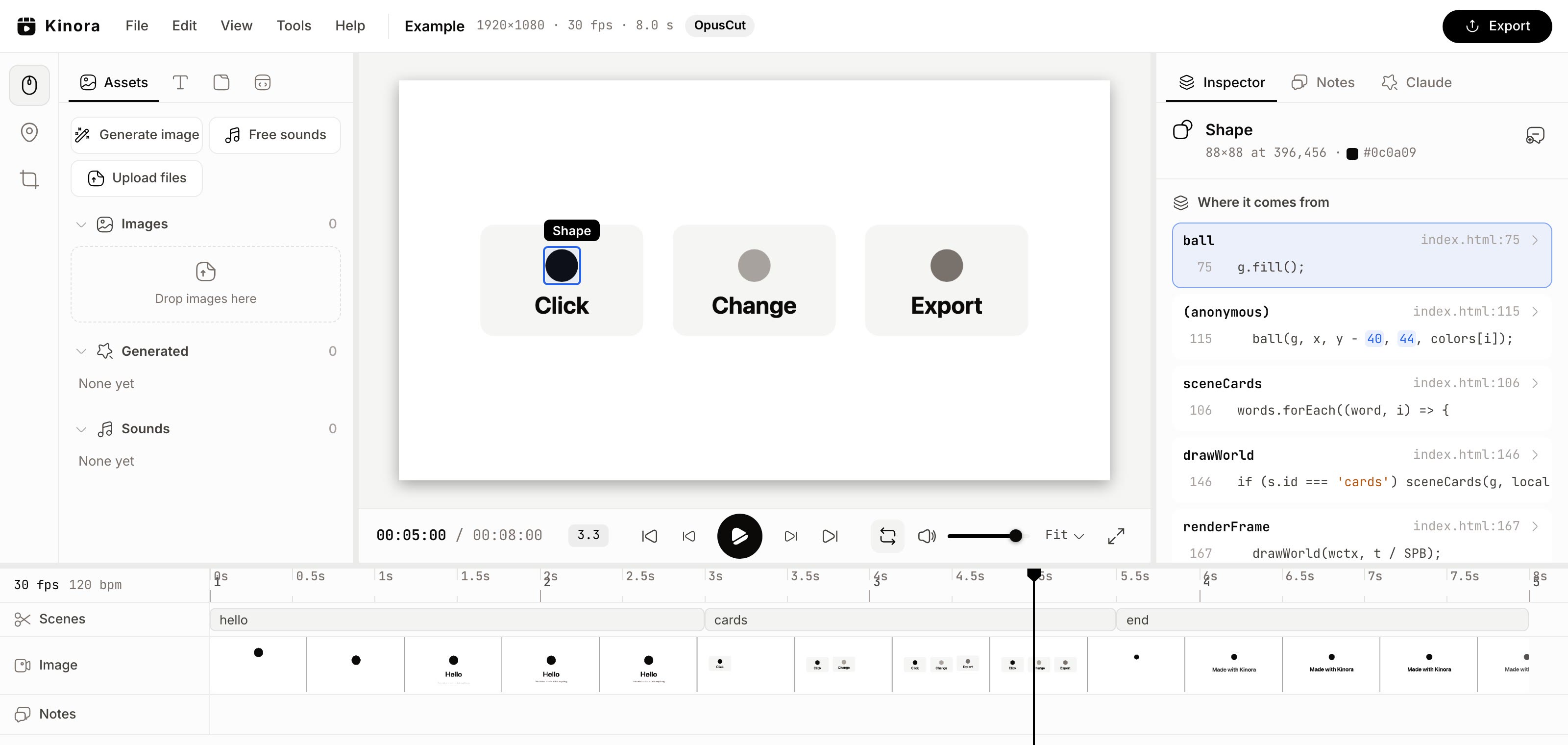
The title is a little big, a sound comes in late, the ball should be orange. Fix it on the video, not in a hunt through the code.
Click to code
Every element on the video leads to the line that draws it. Drag a number, pick a color, retype a string.
Claude in the editor
Claude sees the frame you are looking at, changes what you point at, and every request is one undo step.
Texts on the video
Retype any text in place and change its font, weight, size, color and alignment right on the frame.
Sound by track
One lane per track, mute and solo, plus free sounds and music with the credits written for you.
Export anywhere
MP4, WebM, GIF or PNG, with presets for YouTube, Reels, TikTok, X and 37 more, up to 60 real fps.
51 MCP tools
Everything the interface does is available to agents: Claude Code, Codex, Cursor or any MCP client.
How it works
Your code, your computer, your Claude account
Open a video
Point Kinora at a folder with a video made with code, or start from the example and a short tour.
Click what you want to change
Edit values by hand, or leave a note on a frame, a zone or a range and ask Claude to handle it.
Export
Pick a platform preset and render locally. Nothing leaves your machine unless you ask it to.
Install
Up and running in a minute
Nothing to install with npm: the server, the MCP server and the interface come built. Kinora uses the claude command signed in with your own account, and never sees a key.